Under GDPR, data retention is a critical requirement. It mandates that you define and communicate exactly how long personal data is stored before being permanently deleted once it is no longer necessary.
Defining a specific “obsolescence time” can be challenging, as it depends entirely on your business model and the relationship between you and your subscribers. For instance, stating that “an account will be deleted after two years” is often too vague; instead, the focus should be on how long an inactive account is retained.
Tracking Activity
To help you manage this, the Newsletter plugin tracks the “last activity” of every subscriber. We define activity broadly: it can be a link click, a profile update, or a website visit. While Newsletter is not a full-scale monitoring system, it effectively captures interactions like newsletter opens and profile changes.
Managing Inactive Accounts
With access to “last activity” data, blog owners can periodically delete inactive accounts, even if their status is still “confirmed.” As a best practice, we also recommend regularly clearing out unconfirmed, bounced, or unsubscribed contacts.
How to Use the Maintenance Tool
These management options are located in the Subscriber Maintenance panel. The deletion process is designed to be safe and intentional:
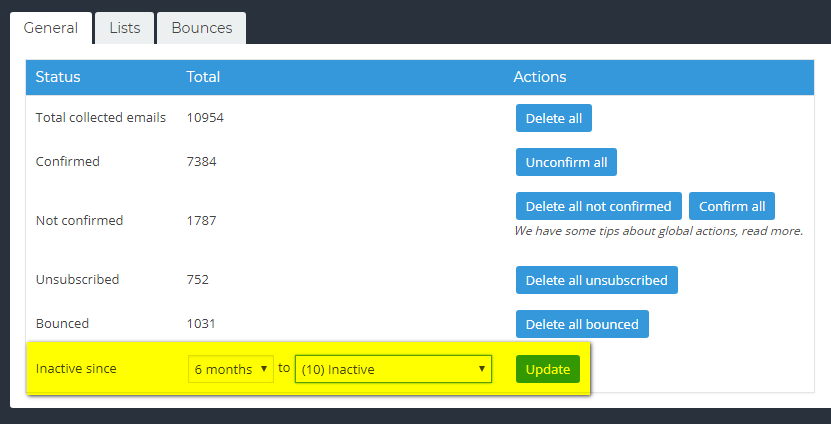
- Targeting Inactivity: The filter allows for precise selection. For example, if you select “inactive since two years,” the tool will target only those who have been inactive for at least that long. It will not affect subscribers who have been inactive for shorter periods, such as four months.
- Safe Deletion: Instead of immediate deletion, inactive subscribers are first moved to a specific list of your choosing.
- Re-engagement: Moving them to a list first gives you the opportunity to send one “last contact” re-engagement email before the final deletion.
Important: The deletion of subscribers is irreversible. Once a contact is removed from the database, it is impossible to retrieve their data or history. We strongly recommend performing a full backup of your subscribers before proceeding with any bulk deletion.
The tool is available in the Subscriber Maintenance panel as shown in the picture below.
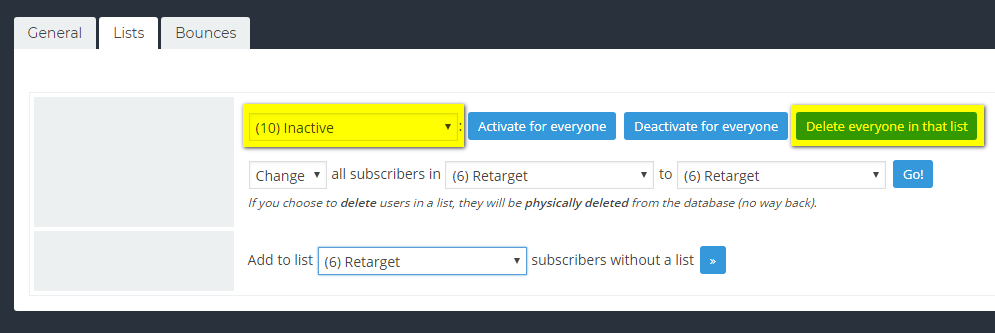
If you finally decide to delete those subscribers permanently, you can move to the lists panel and use the deletion tool.