
Home › Forums › Newsletter Plugin Support › Emails not sent *only* to subscriber lists
- This topic has 23 replies, 3 voices, and was last updated 5 months ago by
User.
-
AuthorPosts
-
February 20, 2026 at 11:57 pm #353991
User
ParticipantI have been using the newsletter plugin for several months now and I have been very happy with it. I send a monthly newsletter to a small distribution (less than 100 subs). The last email I sent on January 20th worked fine. This month I built the newsletter, sent myself a preview no problem – received right away. My scheduled job to the sub list ran at 100 / hour but no emails were received (0 clicks, opens, etc..). Not in spam etc.. I duplicated the email and sent it again manually – same result. I ran the test email (Test the email delivery Check if your blog can deliver emails. Run a test.) and it worked.
I chatted with BlueHost twice. Once they said they changed setting on the backend (no change) and once they said they needed to run a scan for virus. I did find and resolve The signature SL-PHP-FILEHACKER-ioe.UNOFFICIAL ssv3_directory.php I haven’t tried to resend after resolving that issue.
I use the out of the box mail sender (no additional wp mail plugins or anything).
The send stats say 100% sent with no errors
Any ideas on why individual emails send but a small list will not?
February 21, 2026 at 9:08 am #353994Michael
KeymasterHello, I’m not sure if the infection you were experiencing has nothing to do with the sending issue (it might have, it really depends on what kind of malware infected your website and if you managed to completely remove it – which you might think you have, but in my experience it’s really really difficult to clean up a malware/injection without the intervention of a professional).
that being said, only logs can help understand why the actual send don’t go out. Please go to Help > Logs and let me know if you see some logs there. Also send me a screenshot of the full Help > Sending dashboard.
Thanks
February 21, 2026 at 2:02 pm #354026ParticipantThanks for the reply. I do tend to doubt the malware had an impact but wanted to share the context from Bluehost. Bluehost did a full scan and I followed instructions on removal.
I took several screenshots and dopped them in a Google Photos album. Pls let me know what you think or if there are any other shots that would be helpful. The last mail to the sitribution list was on Jan 20. The only log update since then was a newsletter update. no emails were added since the last send.
Domain: mafcnj.org
newsletter: NewsletterThanks
MattFebruary 22, 2026 at 9:53 am #354047KeymasterHello Matt,
thanks for the info. Please install Wp Mail Logging plugin as described here (https://www.thenewsletterplugin.com/documentation/troubleshooting/email-sending-issues/#wp-mail-logging) and perform a test send. Get back to me with your findings.
Michael
February 22, 2026 at 3:04 pm #354049ParticipantThanks Michael.
I installed the plugin, duplicated the last newsletter, sent it realtime. 0 received just like before, and no log was generated. I added 3 screenshots with the log config page, log page, and updated email sent. Maybe this isn’t surprising and helps troubleshoot?Let me know if you need anything else.
Thanks
MattFebruary 22, 2026 at 5:01 pm #354052ParticipantOne additional note. When I send an individual single test email it does work and log in WP Mail Logging. Added screenshots
Matt
February 25, 2026 at 12:44 pm #354193ParticipantAfter a few days there are many single emails sent and logged with no errors. What do you recommend for troubleshooting? The 3 areas I can think of are:
- The newsletter itself – try with a new newsletter – but need to understand what made this one fail
- The Distribution List – no new adds since the last successful send, and no errors logged
- The Plug In – The plug in was updated between sends and again once since.
Thanks
MattFebruary 27, 2026 at 9:44 am #354302KeymasterHello Matt,
sorry for this delay. I cannot see particular errors from your screenshots, so let’s try another way. Ask your hosting provider if there’s a Smtp service included in your plan, if so, use Wp Mail Smtp and set your provider’s Smtp connection data. Then do a test send.
Michael
March 2, 2026 at 7:52 pm #354385ParticipantGiven that email sending works for all other email updates I am hoping to keep the mailer set up simple as it is now. The benefits solve problems I don’t currently have (deliverability in particular).
The Newsletter plugin has been updated 2x since the 20th and of course other installed plugins have as well.
In order to test if the issue is with the newsletter, the list, or the plugin I tried these tests.
1. Created a new distribution list with only a few subscribers.
2. Duplicated a different newsletter and sent it to the limited subscriber list – Success.
3. Duplicated the newsletter that failed previously and sent it to the limited subscriber list – Success.So I think this means either the updated to any of the plugins have resolved the issue OR there is an issue with the full list of subscribers.
Matt
March 3, 2026 at 9:34 am #354410KeymasterHello Matt,
did you also have the chance to try a full send?
Michael
March 3, 2026 at 11:59 am #354427ParticipantMichael
Not yet – I send regular newsletters on the 20th of the month and wanted to avoid confusing the members with a test email. If it doesn’t send with the ful list, do you have any suggestions on where to look for troubleshooting next? Odd that there aren’t any errors on the full send.Thanks for all your help!
MattMarch 20, 2026 at 3:25 pm #355044ParticipantUpdate
I sent today and everything seems to be normal. Not sure if it was a one off issue or one of the Plug In updates helped. I was also pretty short on storage so I upgraded to more. Thank you again for all of the help and responses.Matt
March 26, 2026 at 3:07 pm #355215KeymasterHello Matt,
sorry for this delay. I’m not sure either, cause we didn’t push any particular update regarding the sending engine. Anyway, glad this has been solved.
Michael
April 20, 2026 at 4:52 pm #355832ParticipantGrrr this is happening again this month.
– This is the newsletter: https://mafcnj.org/?na=view&id=19
– Test emails send fine
– All other emails are send and logged
– no logging of newsletter / send or failIs my only option to set up SMTP mail – really hoping not to.
Thanks
MattApril 20, 2026 at 4:59 pm #355833Stefano
KeymasterHi Matt, please, check the Help/Sending panel, which mailer is reported there?
April 20, 2026 at 5:14 pm #355835ParticipantMailer
WordPress wp_mail() function
Could be enhanced by an SMTP plugin.April 20, 2026 at 5:26 pm #355836KeymasterOk, the plugin is calling the wp_mail(), so if you have the WP Mail Logging plugin installed, every email created by Newsletter has to be logged.
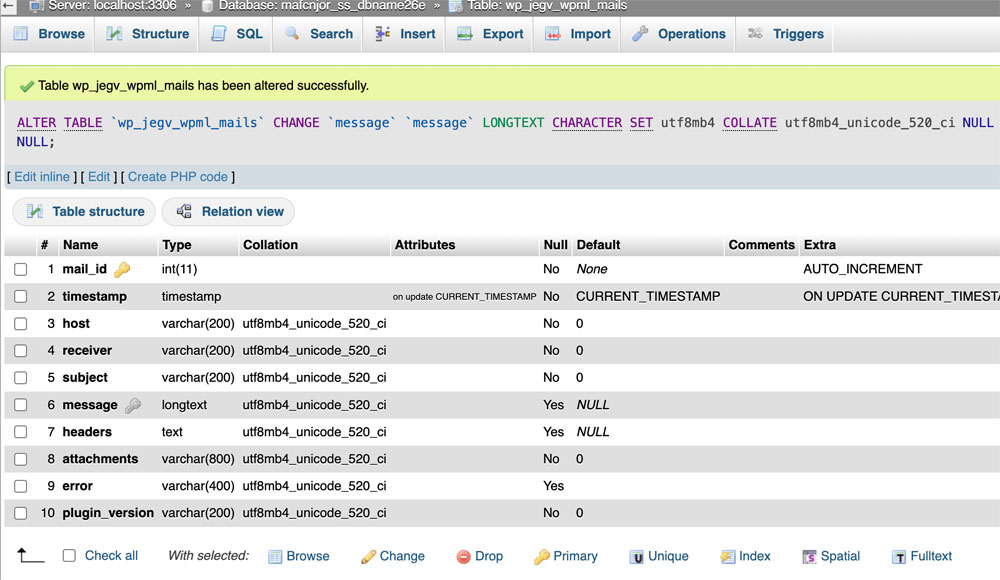
BUT that plugin is not able to log emails with long content. That is a defect of that plugin since its logging table is configured to use a TEXT field instead of a LONGTEXT… only modifying the database, you probably will see the newsletters logged (or you can send a newsletter with a small body, if you want to make a test).
So, you can be sure the email are “sent”, but if there is an error it cannot be logged by wp mail logging. It’s anyway probable your hosting provider is dropping the emails when it sees you’re sending many emails in a row. Ask them to check again the mail log, there are no other possibilities.
April 20, 2026 at 5:27 pm #355837KeymasterBTW, if they provide an SMTP server, for example to give you mailboxes for your domain, it’s a good idea to use that SMTP.
April 20, 2026 at 6:55 pm #355839ParticipantGot it, thanks. I set up mail in CPANEL and configured WP Mail SMTP. After a few tries with config I got authentication to work but this error message when I tried to send a test email to myself.
—
Error due to unsolicited and/or bulk e-mail.
This means the connection to your SMTP host was made successfully, but the host rejected the email.Typically this error is returned when you are sending too many e-mails or e-mails that have been identified as spam.
—April 20, 2026 at 11:23 pm #355850ParticipantOK, so after some chats with BlueHost, I have it configured correctly and do not receive any errors when sending test emails. I am using the Bluehost SMTP server.
How do I get the Newsletter plugin to recognize SMTP WP Mail? It still shows WordPress wp_mail() function under help / sending.
Matt
April 21, 2026 at 7:52 am #355859KeymasterHi, the plugin will send via WP Mail SMTP automatically, since it uses wp_mail() and WP Mail SMTP is modifying that function under the hood.
April 21, 2026 at 1:12 pm #355874ParticipantOK, got it thanks.
I duplicated the newsletter and tried to re-send, but unfortunately the same result.
Nothing in WP Mail Logging either.
I am going to send it another way for this month and would like to continue troubleshooting
Thanks
MattApril 21, 2026 at 1:53 pm #355875KeymasterHi, if your email is “long” it won’t be logged. If you can ask someone to modify the database, ask him to seek for the table wp_wpml_mails and to change the “message” field from TEXT to LONGTEXT.
April 24, 2026 at 9:56 pm #356028 -
AuthorPosts
- You must be logged in to reply to this topic.